Voice
Voice Agents use TTS (Text to Speech), which generates audio that LLMs generate during the course of a conversation. This is the audio that the end user having the conversation listens to.
Talkr platform supports ElevenLabs, OpenAI, Google, Azure Speech, Deepgram, Cartesia, Murf, Smallest AI, MiniMax, Sarvam, Rime, Inworld, Camb.ai, xAI, and LMNT. There are some voices from the providers that we ship by default. You can refer to the providers API documentation to select a voice ID that's most relevant for your language requirement.
If your agent needs to speak more than one language in the same call, see Voice & Language Profiles — Talkr can switch TTS voice mid-call as the detected language changes.
Voice providers receive the data needed to synthesize speech, such as generated text, selected voice, model settings, and request metadata. Review the provider's data processing, retention, model training, and regional hosting policies before using sensitive data.
For locally deployed or self-hosted TTS models, Talkr also supports Speaches, an OpenAI API-compatible server for speech generation.
Browsing voices
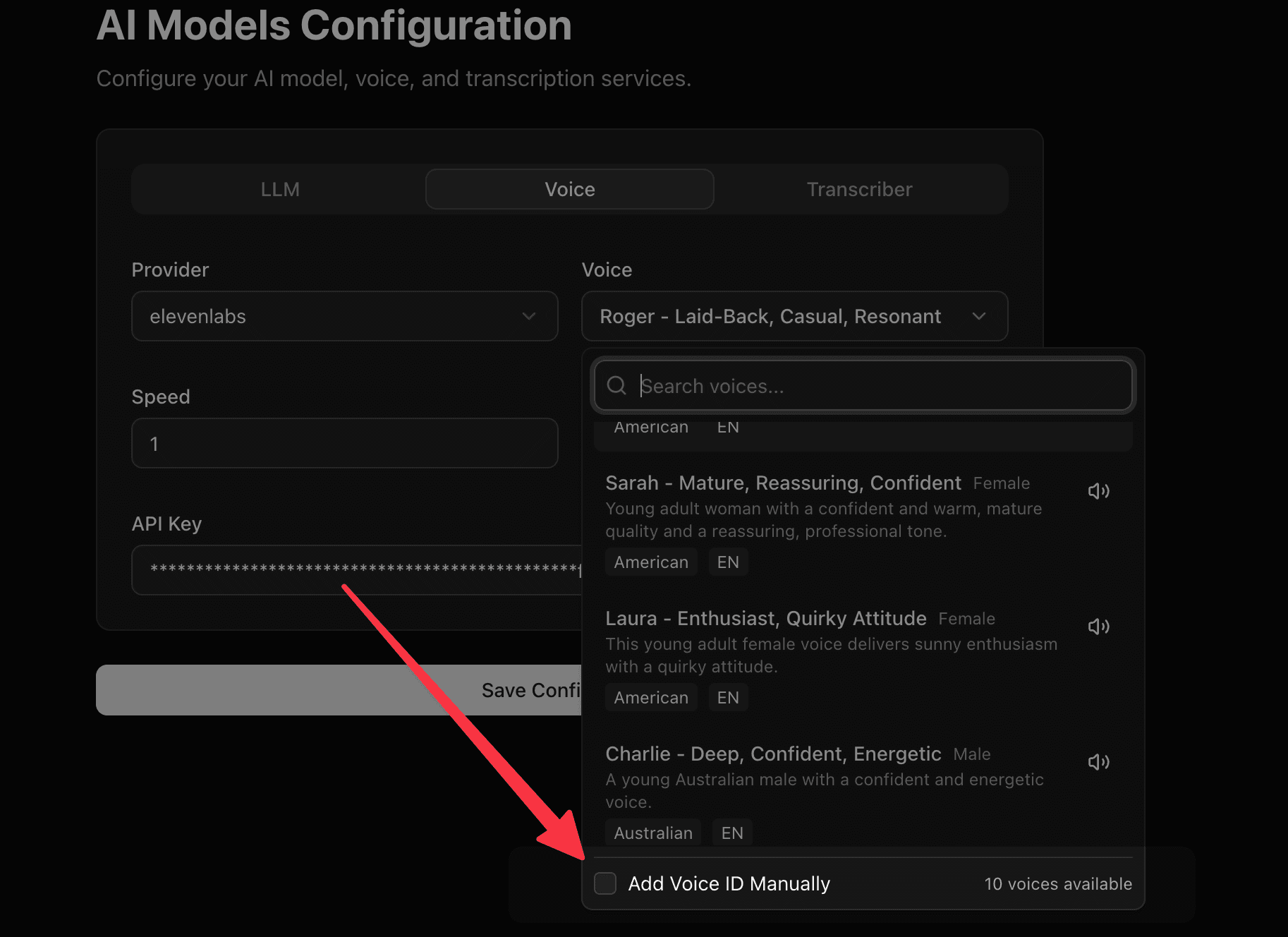
For Google, ElevenLabs, Cartesia, Deepgram, Azure Speech, Sarvam, and Smallest AI, the Voice field is a searchable picker backed by that provider's real voice catalog (fetched live using your saved API key) — search by name, and filter by gender, accent, or language instead of needing a voice ID upfront. Providers browse against your saved credentials, so save your API key first if the picker shows no results.
If you don't find your favourite voice, or you're using a provider without a live catalog, you can always add the voice ID manually.
Cartesia: baseline emotion
Cartesia (on sonic-3/sonic-3.5 models) supports an optional Emotion field that sets a baseline emotional tone for every reply (e.g. "calm", "excited", "sympathetic") — independent of Adaptive Voice Tone, which adjusts delivery live per-turn based on the caller's detected emotion. Leave it blank for Cartesia's default neutral delivery.
Murf: model, style, speed, and pitch
Murf streams audio over a low-latency WebSocket connection built for real-time voice agents. Add your Murf API key, then pick a voice ID from your Murf voice library (for example en-US-matthew).
Beyond the standard model and voice fields, Murf exposes:
- Style — an expressiveness preset such as "Conversation" or "Promo". Leave it blank for the voice's default style.
- Speed and Pitch — numeric controls from -50 to 50. Positive values speak faster/higher, negative values slower/lower.
The Model field defaults to falcon-2, Murf's lowest-latency model (time-to-first-audio under 100ms per Murf's docs). gen2 is the other supported option, for a different voice/quality tradeoff.
Murf enforces a concurrency limit per region on the real-time endpoint: 15 simultaneous connections for US-East, 2 for every other region. The Base URL field defaults to Murf's global auto-routing endpoint, which picks your nearest region — if you expect more than 2 simultaneous calls using Murf outside the US, set Base URL to https://us-east.api.murf.ai to route through the higher-concurrency region, or contact Murf about raising your regional limit.
ElevenLabs: expressiveness controls
Beyond voice, model, and speed, ElevenLabs exposes:
- Stability and Similarity Boost — Stability trades expressiveness for consistency (lower is more expressive but less predictable, higher is flatter but more stable); Similarity Boost controls how closely the output matches the original voice's timbre. Both default to values ElevenLabs recommends for conversational use, and can be tuned per voice.
- Style — style exaggeration for more dramatic delivery. Leave it blank for the voice's default.
- Speaker Boost — boosts similarity to the original speaker at some cost to latency.
- Text Normalization — whether numbers, dates, and similar text are normalized before synthesis (
auto,on, oroff).
Inworld: temperature
Temperature controls how much randomness Inworld introduces into synthesized speech — higher values sound more varied and expressive, lower values sound more consistent and predictable. Leave it blank for Inworld's default.
MiniMax: volume, pitch, emotion, and language controls
Beyond voice, model, and speed, MiniMax exposes:
- Volume and Pitch — loudness and pitch adjustment.
- Emotion — sets a baseline emotional tone:
happy,sad,angry,fearful,disgusted,surprised,calm, orfluent. - Text Normalization — normalizes numbers and mixed Chinese/English text before synthesis.
- LaTeX Read — reads LaTeX formulas aloud instead of skipping them.
- Language Boost — improves recognition of a specific language in multilingual text.
Azure Speech: SSML expressiveness controls
Azure Speech exposes several SSML-based controls for shaping delivery:
- Emphasis — emphasis level (
strong,moderate,reduced). - Pitch, Rate, Volume — accept either relative adjustments (e.g.
+10%,-5Hz) or descriptive values (e.g.high,slow,loud). - Role — a voice role for expression, e.g.
YoungAdultFemale(only supported by certain Azure neural voices). - Style and Style Degree — a speaking style such as
cheerful,sad, orexcited, with Style Degree controlling how intensely it's applied (0.01to2.0, entered as text).
Not every Azure voice supports every style or role — check your chosen voice's capabilities in Azure's own voice gallery before setting these.
Rime: model-specific tuning
Rime exposes a large set of tuning fields, most of which only apply to specific models:
- mistv2 only: Reduce Latency (trade quality for speed), Pause Between Brackets and Phonemize Between Brackets (control how bracketed text is handled), No Text Normalization, Save OOVs (log out-of-vocabulary words).
- arcana only: Repetition Penalty (
1.0–2.0), Temperature (0.0–1.0), and Top P (0.0–1.0) — standard generation-sampling controls. - arcana, mistv3, and coda: Time Scale Factor — values above
1.0slow the audio down, values below1.0speed it up. - All models: Segment (text segmentation mode:
immediate,bySentence, ornever) and Inline Speed Alpha (inline speed-control markup within the text itself).
Leave any of these blank to use Rime's own default for your selected model.
Sarvam: pitch, loudness, and preprocessing
Beyond voice, model, language, and speed, Sarvam exposes:
- Pitch (
-0.75to0.75) and Loudness (0.3to3.0) — not supported onbulbul:v3/bulbul:v3-beta. - Temperature (
0.01to1.0) — sampling randomness,bulbul:v3/bulbul:v3-betaonly. - Enable Preprocessing — whether Sarvam preprocesses text before synthesis.
- Min Buffer Size and Max Chunk Length — advanced streaming controls for how much text Sarvam buffers before generating audio.
xAI: speed and streaming controls
Beyond voice and language, xAI's real-time endpoint exposes:
- Speed (
0.7to1.5) — playback speed. - Optimize Streaming Latency (
0–2) — trades a small amount of audio quality for lower time-to-first-audio. - Text Normalization — whether numbers and similar text are normalized before synthesis.