Interruption Handling
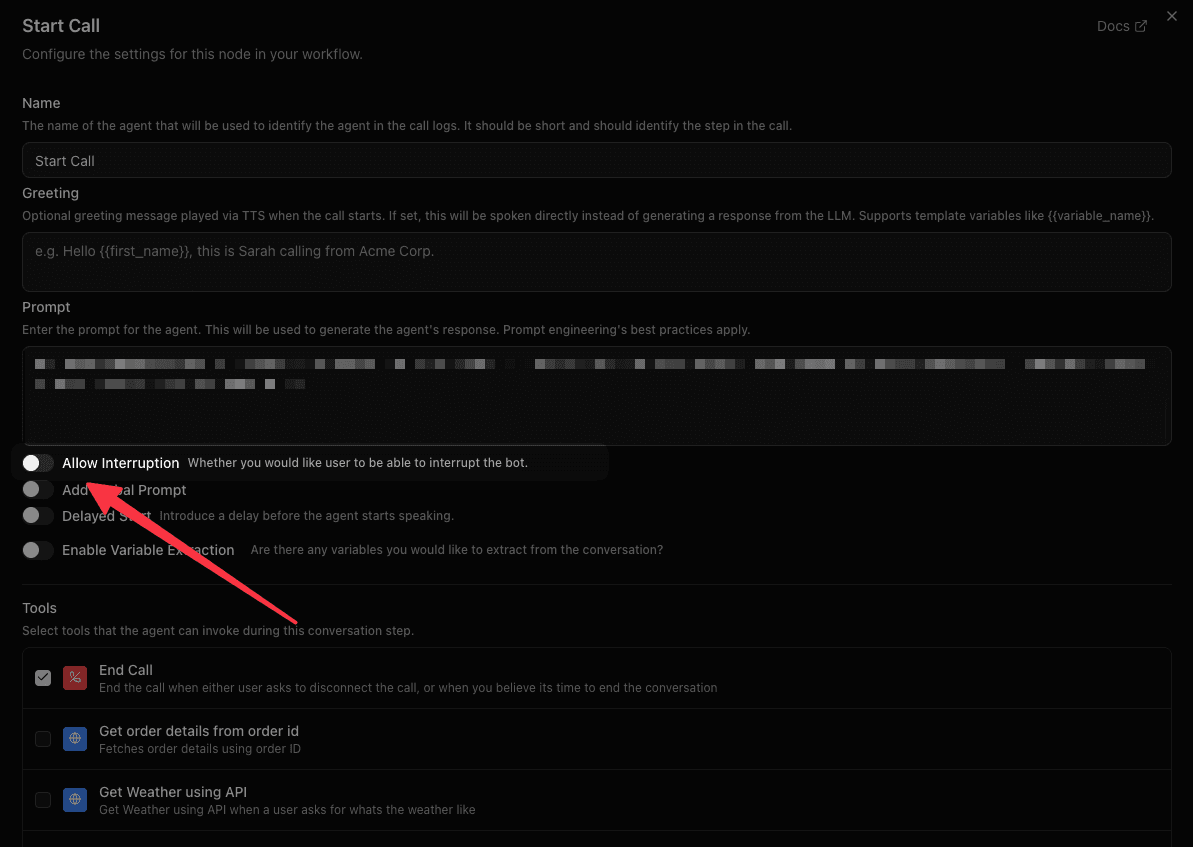
Control whether users can interrupt the bot while it is speaking by configuring the Allow Interruption toggle on each node.
Overview
Interruption handling controls whether the user can "barge in" and interrupt the bot while it is speaking. This is configured per node in the workflow editor, giving you fine-grained control over conversation flow.
What is VAD?
VAD (Voice Activity Detection) is what makes barge-in possible — it's the model that listens to the incoming audio stream and decides whether the caller is currently speaking. Talkr's pipeline runs Silero VAD by default to detect the start and end of user speech in real time. Some realtime providers (such as OpenAI Realtime, Azure Realtime, and Grok Voice Agent) supply their own VAD signals, so local Silero VAD is skipped for those calls.
When Allow Interruption is enabled on a node, VAD is what triggers the interrupt: the moment it detects the caller has started talking, the bot's speech is cut off and the pipeline starts processing the new input. When interruption is disabled, VAD output for the user's mic is ignored until the bot finishes speaking.
VAD also feeds turn-taking more generally — it's part of how Talkr decides a caller has finished a turn and the agent should respond, independent of whether interruption is enabled.
Valid sample rates: Talkr's pipeline runs VAD at either 8000 Hz or 16000 Hz — no other value is accepted. The overall pipeline sample rate is capped at 16 kHz to satisfy this. This only matters if you're integrating a custom telephony provider; telephony providers built into Talkr (Twilio, Vonage, Plivo, etc.) already negotiate a supported rate for you.
How It Works
Each node in your workflow has an Allow Interruption toggle:
- Disabled (default) — The bot finishes its entire response before accepting user input. The user's microphone is temporarily muted while the bot speaks.
- Enabled — The bot stops speaking as soon as the user starts talking, and immediately processes their input. This creates a natural, conversational experience.
When interruption is disabled and the user tries to speak during bot speech, a one-time warning appears in the live transcript indicating that interruption is disabled for that step.
When to Disable Interruption
Disabling interruption is useful when the bot needs to deliver a complete message without being cut off:
- Legal disclaimers — Ensure the full disclaimer is spoken before proceeding.
- Critical instructions — Step-by-step directions that lose meaning if partially heard.
- Greeting or introduction — Let the bot finish its opening before the user responds.
- Confirmation summaries — Read back important details (appointment times, order totals) in full.
When to Enable Interruption
Keep interruption enabled for interactive conversation stages:
- Q&A or objection handling — Let the user jump in naturally.
- Open-ended discussion — Feels more human when either party can interject.
- Long responses — Allow the user to redirect if the bot goes off track.
Configuring Interruption
- Open your workflow in the Voice Agent Builder.
- Select the node you want to configure.
- Toggle Allow Interruption on or off in the node settings panel.
- Save your workflow.
You can set different interruption behavior for each node. For example, disable interruption on your Start Node greeting but enable it on all subsequent Agent Nodes.
What the User Experiences
| Interruption | Bot Speaking | User Speaks | Result |
|---|---|---|---|
| Enabled | Yes | Yes | Bot stops, processes user input |
| Disabled | Yes | Yes | Bot continues, user input is ignored until bot finishes |
| Either | No | Yes | User input is processed normally |
When interruption is disabled, the platform mutes the user's audio input while the bot is speaking. Once the bot finishes, the microphone is automatically unmuted and the user can respond normally.
Turn Detection & Interruption Tuning (workflow-level)
Everything above is the per-node Allow Interruption toggle. Separately, under the agent's Settings tab, two workflow-wide sections tune the underlying detection mechanics rather than just enabling/disabling interruption:
Turn Detection
Controls how the agent decides the caller has finished speaking (their turn is over), independent of interruption.
-
Detection Strategy
- Transcription-based (default) — ends the turn as soon as the transcription indicates completion. Best for short responses (one or two words).
- Smart Turn Analyzer — uses an ML model to detect natural end-of-turn pauses. Best for longer responses with natural pauses mid-sentence.
-
Pause Before Replying (Transcription-based only) — how long the agent waits after the caller pauses, in case they haven't finished. Default: 0.4 seconds. Range: 0.2–3s.
This is the single biggest piece of response time you control directly — typically a quarter to a third of how long a caller waits for an answer. Every reply pays it, so a tenth of a second here is felt on every turn of every call.
Lower it for a noticeably snappier agent. Raise it if callers who pause mid-sentence — thinking, reading a number off a card, describing symptoms — get answered before they've finished. Below about 0.2 seconds the agent begins replying into ordinary breathing pauses, which comes across as interrupting rather than attentive, so 0.2s is the minimum.
Tune it against your own calls rather than guessing. The Reports page breaks every reply down by stage, so you can see the turn-detection portion shrink and confirm the overall response time came down with it.
-
Incomplete Turn Timeout (Smart Turn Analyzer only) — the worst-case wait, in seconds, when the model isn't confident the turn is complete. Not the typical response time. Default: 1 second. Range: 0.5–10s.
Interruption Strategy
Controls how barge-in is confirmed, for nodes where Allow Interruption is on.
- Default — uses the platform default: the external STT provider's turn signals when available, otherwise local VAD (see What is VAD? above).
- Minimum words — waits for a minimum number of transcribed words before treating the caller's speech as a real interruption, filtering out stray noise or filler sounds. Configure Minimum Words Before Interruption (default: 3, range 1–10). Since this can hold back a genuine one-word interruption like "Stop", add phrases to Always-Interrupt Phrases that should bypass the word count immediately — enter them comma-separated, matching whatever language(s) your agent speaks (there's no default list, since interruption words aren't the same across languages).
- Provisional VAD (Experimental) — pauses the bot's audio the instant VAD detects voice activity, then confirms the interruption once transcription catches up (rather than committing to the interruption immediately on VAD alone). Configure Provisional Pause — how long, in seconds, to pause bot audio while waiting for that transcript confirmation (default: 1.5s, range 0.1–5s).
Both sections are found on the agent's Settings page, above the per-node Allow Interruption behavior described earlier on this page.