Model Configurations
Configure the speech-to-speech or bring-your-own-key models your Talkr agents use.
How model configurations work
Model Configurations define the default AI model setup for your organization. Agents use this configuration unless you set agent-level model overrides in the agent settings.
To configure models, open Models in your Talkr dashboard:
- Hosted:
https://talkr.intelstacks.com/model-configurations - Self-hosted:
http://localhost:3010/model-configurations - Local development:
http://localhost:3000/model-configurations
Talkr is bring-your-own-key (BYOK) only — there is no managed AI model tier. The Models page has two top-level sections:
| Section | When to use it |
|---|---|
| Speech to Speech | Use a realtime speech-to-speech model for the live conversation. You still configure an LLM alongside it for variable extraction and QA. |
| BYOK | Bring your own provider keys and configure LLM, Voice, Transcriber, and Embedding models separately. |
Model settings are organization-scoped. If no agent-level override is set, every agent in the organization uses the saved global configuration.
Speech to Speech
Use Speech to Speech when you want a realtime model to handle the live spoken conversation directly. In this mode, the realtime model handles speech input and speech output, so you do not configure separate Voice and Transcriber services.
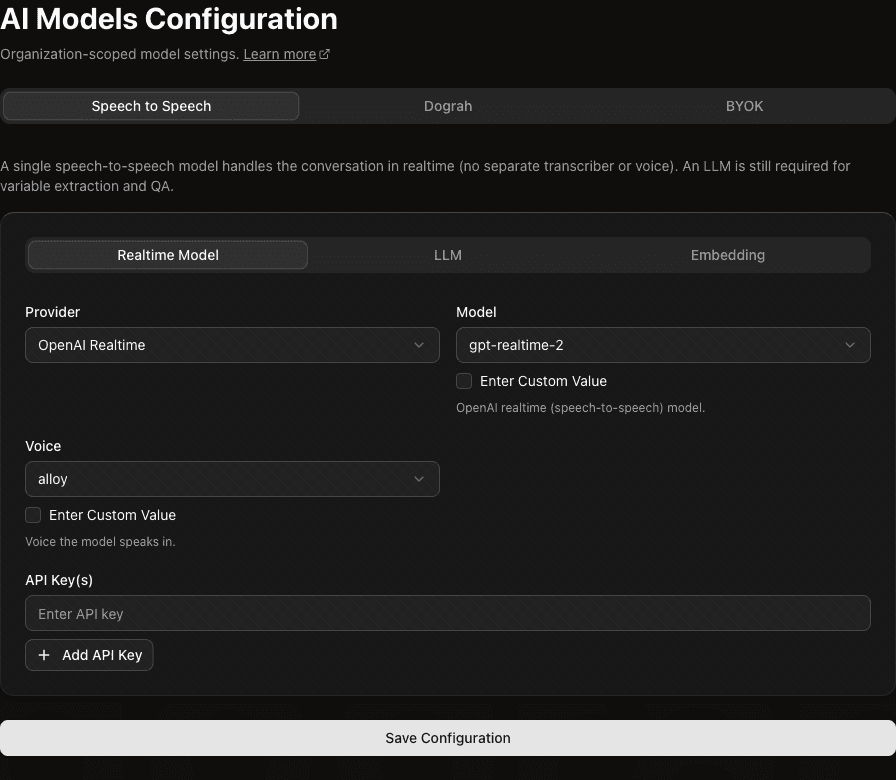
The Speech to Speech section has nested tabs:
| Tab | What to configure |
|---|---|
| Realtime Model | The speech-to-speech provider, model, voice, and API key. |
| LLM | A standard LLM used for non-realtime tasks such as variable extraction and QA analysis. |
| Embedding | An embedding model used by features that need embeddings, such as retrieval from knowledge base content. |
An LLM is still required when you use Speech to Speech. The realtime model handles the live voice conversation, but Talkr uses the LLM for analysis tasks that happen outside the live audio stream.
BYOK
Use BYOK when you want to bring your own provider accounts and API keys. This gives you separate control over each model category.
When you use BYOK or external model providers, Talkr sends only the data required for the selected service to operate. Depending on the provider and service type, this may include prompts, conversation history, transcripts, audio, generated text, tool/function definitions, tool inputs or results, and request metadata.
Provider data handling varies. Review each provider's data processing, retention, model training, and regional hosting policies before using sensitive data.
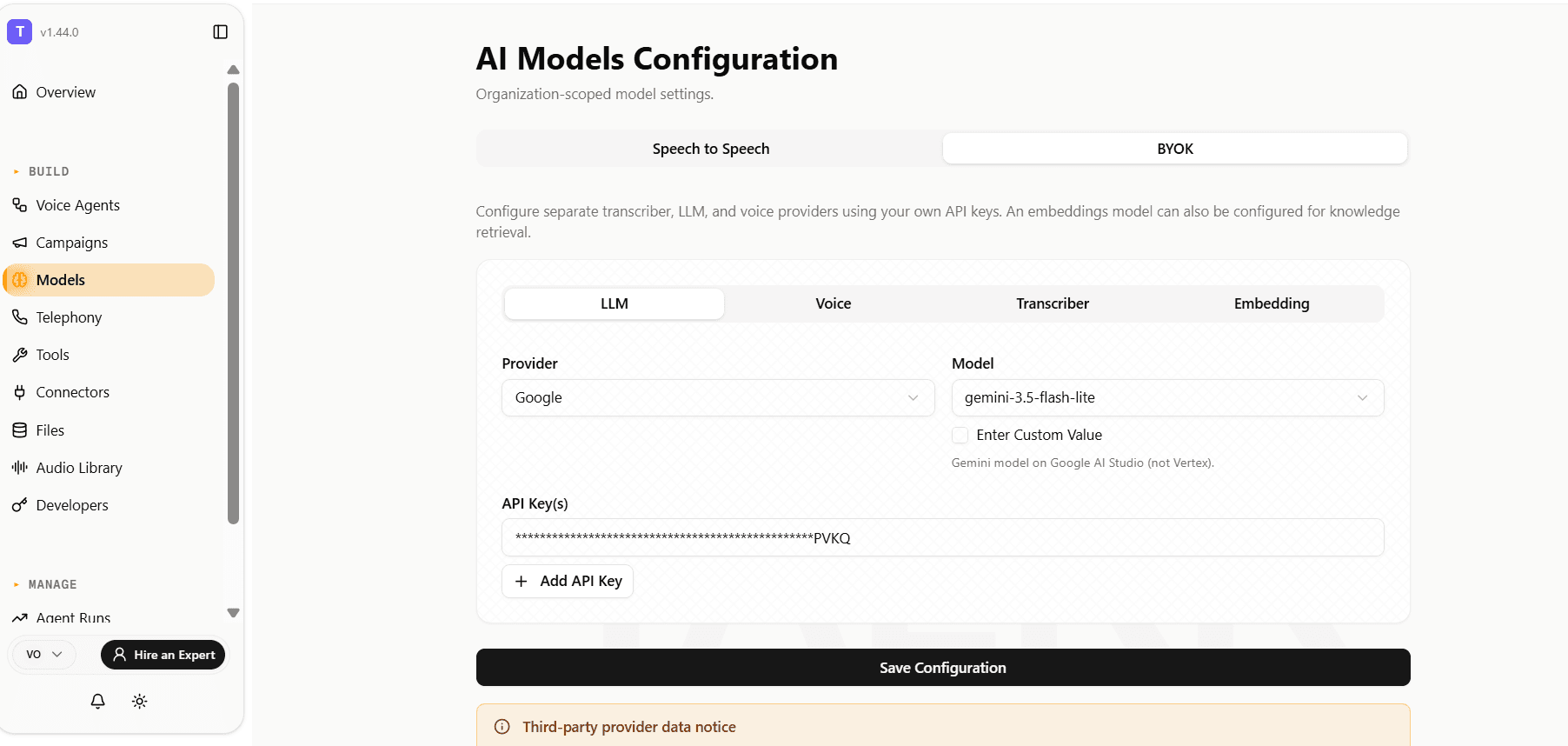
The BYOK section has nested tabs:
| Tab | What to configure |
|---|---|
| LLM | The chat or reasoning model provider, model, optional base URL, and API key. |
| Voice | The text-to-speech provider, voice, model, speed, optional base URL, and API key. |
| Transcriber | The speech-to-text provider, model, language, and API key. |
| Embedding | The embedding provider, model, and API key. |
Provider-specific fields appear only when they apply. For example, OpenAI-compatible LLM providers can expose a Base URL field, ElevenLabs voices can expose a voice ID, and transcribers can expose language options.
One LLM option is different from the rest: Classic IVR (No AI) doesn't call any external model — it deterministically routes calls on keypad (DTMF) input instead of AI reasoning, for building traditional "press 1 for sales" menus with no per-call AI cost. No API key or model needed. See Classic IVR (No AI) for how to build one.
You don't have to configure all four BYOK tabs at once. Bring your own key for just the service you care about — for example, only Voice with your own Cartesia key — and leave the rest unset. Any service you don't configure falls back to Talkr's trial-managed default for that service, and you're only billed trial credits for the portion actually running on Talkr's key. At least one service must be configured to save the BYOK section.
Prompt caching
For LLM providers that support server-side prompt caching, Talkr automatically caches your agent's system instructions and tools once the same ones have been reused across a few consecutive turns in a call. Later turns in that call reuse the cached version instead of resending it, which lowers per-turn cost and speeds up the LLM's response.
This is fully automatic — there's nothing to configure, and it never changes what your agent says. If a node's instructions or tools change (for example, moving to a different part of your workflow), caching adapts automatically rather than reusing a stale cache.
Support depends on the LLM provider you've configured, and is active today across every provider except Groq:
| Provider | How caching works |
|---|---|
| OpenAI, Azure OpenAI, xAI (Grok), OpenRouter, AtlasCloud | Automatic on the provider's side for prompts over ~1024 tokens — no setup needed. |
| Anthropic, AWS Bedrock | Enabled by Talkr automatically when you configure the provider. |
| Google Gemini (direct API or Vertex AI) | Talkr creates an explicit cache the first time a node's instructions and tools repeat across turns, then reuses it for the rest of that node. |
| Groq | Not supported — Groq's inference model doesn't offer a caching API. |
Agent-level model overrides
You can override the organization model configuration for an individual agent. This is useful when different agents need different models, voices, transcribers, or providers.
To configure an override:
- Open the agent.
- Go to Settings.
- Open Model Overrides.
- Enable the override for the service you want to customize.
- Configure the provider, model, and keys for that service.
- Save the agent settings.
Agent-level overrides are selective. For example, you can override only the Voice service for one agent while it continues to use the organization-level LLM and Transcriber configuration.
This is also how you mix a no-AI menu into an organization that otherwise runs conversational agents: leave the organization-level LLM as a real model, then override just the LLM service on your keypad-menu workflow to Classic IVR (No AI). Every other agent keeps using the org default untouched.